About the Personal Insurance Portal (PIP)
Who can access PIP?
The Personal Insurance Portal, or PIP, offers a fast, convenient online experience for appointed agents and support staff who quote and service homeowners insurance policies through Aspera.
What is PIP?
PIP is Aspera’s proprietary online quoting and servicing platform. We introduced PIP in 2025 alongside the Homeowners E&S (HOMES) product, and is the exclusive portal for quoting and servicing all HOMES accounts. PIP is now the exclusive portal for quoting and servicing manufactured housing business, as well. Specifically:
- All California and Colorado manufactured housing business
- All North Carolina manufactured housing business quoted and bound on or after July 8, 2026
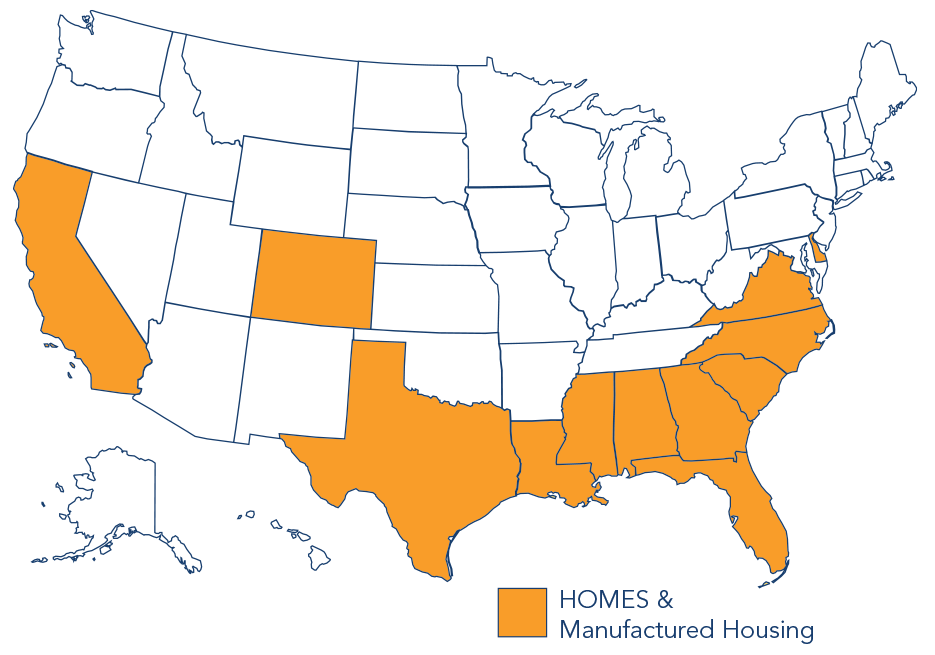
- All manufactured housing business in other open states quoted and bound on or after July 30, 2026. See the map below for currently open states.
If you’ve been working with us for a while, then you’re also familiar with the legacy portal. The legacy portal is the quoting platform you’ve used to quote and service manufactured housing accounts for over a decade. Although PIP has replaced the legacy portal for all NEW manufactured housing business, manufactured housing business bound in the legacy portal on or before July 7, 2026 in North Carolina, or on or before July 29, 2026 in all other open states, will remain in the legacy portal until it’s ready to renew. You’ll continue to service it there until approximately 60 days before the renewal date, at which point it will automatically move to PIP and we’ll notify you.
Where do I access PIP, and where can I learn more?
You can visit PIP online (https://pip.asperains.com/) and log in using your assigned credentials. Please note that credentials cannot be shared within an office. Each user will need their own unique username and password.
To learn more about using PIP, refer to the External User Guide provided during onboarding. It includes login instructions, quoting steps, FAQs, and underwriting guidance.
Why do I need to switch to PIP when I’ve been using the legacy portal for years?
PIP represents the next evolution of quoting convenience and technology. With all new HOMES and manufactured housing accounts on PIP, you have a single, one-stop resource to manage your Aspera business.
Keep in mind, however, that the legacy portal is not going away entirely. Currently, all HOMES accounts are quoted and serviced in PIP, along with along all new manufactured housing business. However, manufactured housing business quoted and bound on or before the dates below will remain in the legacy portal for servicing until renewal:
- California and Colorado: N/A; all manufactured housing accounts are already in PIP
- North Carolina: Bound in legacy portal on or before July 7, 2026—serviced in legacy until ~60 days before renewal, then auto-moves to PIP
- All other open states: Bound in legacy portal on or before July 29, 2026—serviced in legacy until ~60 days before renewal, then auto-moves to PIP
When can I start using PIP?
If you are appointed with Aspera and have received your log in credentials, you can log in and begin quoting HOMES and manufactured housing business immediately.
Not yet appointed? Get started here.
If you are appointed and do not know your credentials, navigate to https://pip.asperains.com. Click “Can’t log in to your account?” From there, follow the steps to reset your password using your email address. Once your password is reset, you should be able to use your new password to log in and begin quoting!
Access & Login
I’m locked out of my PIP account. What should I do?
Accounts may lock after multiple unsuccessful login attempts. If that happens, navigate to https://pip.asperains.com. Click “Can’t log in to your account?” From there, follow the steps to re-set your password using your email address. If the issue persists, contact brokerageops@asperains.com for assistance.
I reset my password but didn’t receive the email with a verification code. What should I do?
Look for the email in your spam or junk folder first. If you still don’t see it, contact your IT or email administrator and ask them to:
- Determine whether the reset email was quarantined at the server level. Please relay to them that the email will be coming from brokerageops@asperains.com.
- Whitelist emails from our portals’ sending domain: “@asperains.com”
If you still experience problems, please contact brokerageops@asperains.com.
Why did I receive a “change your password” email right after signing up?
That’s part of our standard setup process. Follow the instructions in that email to create your password before logging into the portal for the first time.
Portal Navigation & Product Basics
Which portal should I use to quote?
Use PIP for all HOMES quotes. Refer to the maps below to see if your state has PIP access for manufactured housing accounts. If it does, you can quote all new manufactured housing policies on PIP. Otherwise, you will use the legacy portal to quote manufactured housing until your state migrates to PIP.
Do I need separate login credentials for each portal?
Yes. PIP and the legacy portal each require their own username and password. Please note that credentials cannot be shared within an office. Each user will need their own unique login.
What product(s) can be quoted and serviced in PIP?
PIP is currently used for all HOMES policies in every state where HOMES is available, as well as for manufactured housing accounts in certain states. Manufactured housing accounts in all states will be migrated to PIP over time. We will notify you when that transition happens for your state of residence.
After your state transitions manufactured housing accounts from the legacy portal to PIP, new accounts can be quoted and serviced in PIP. All your existing manufactured housing accounts will remain in the legacy portal until renewal, at which time they will be moved over to PIP automatically. You will need to use the legacy portal to service any manufactured housing policy originally quoted and bound in the legacy portal until the policy renews. A renewal will be generated on PIP 60 days before the renewal date.
Troubleshooting
What should I do if I encounter a bug or system issue?
We’re actively optimizing PIP and rely on agent feedback. If you run into an issue, please report it to brokerageops@asperains.com so it can be reviewed and resolved promptly. Your input helps us make PIP better for everyone.
State & products using PIP for New Business